Table of contents (11 sections)
Claude Code is Anthropic's coding assistant that works in a terminal. It reads your files, runs commands and edits your code. On a website, though, it is missing a sense: sight. It writes the CSS for a button without ever seeing the button.
To let it see, you give it a driven browser: a browser that a program opens, clicks through, then queries. The program then hands Claude back what the page shows. Several solutions exist to wire up that browser, and they don't cost the same. They differ in what Claude has to read, in speed, in the browsers available and in their traps.
On October 28, 2026, I measured eight solutions on the same test page, which contains eight known bugs. The Go language alone provides three of them. Anthropic's Chrome extension, a ninth solution, doesn't run under Linux: I tried it on the Windows side of the same machine. Back in March, I described a responsive testing loop with Claude Code and Playwright. This article compares all the solutions.
The choice in short, depending on what you need:
- Test a site on mobile, tablet and desktop: Playwright as a script or from the command line, the cheapest to read.
- Explore a page with Claude, without writing code: Playwright MCP.
- Debug network, console or performance: Chrome DevTools MCP, the richest and the heaviest.
- Work on a site where you're logged in: a dedicated debugging Chrome, or the Claude in Chrome extension.
- Write a test in a Go project: chromedp.
- Check Safari: Playwright's WebKit for the engine, a real iPhone for the rest.
To try it right away, install Playwright MCP with the command given below.
Then check that claude mcp list shows playwright as "Connected".
Finally, ask Claude to open your local page at 390 px wide and tell you what overflows.
Three ways to show a page to Claude
Claude does not look at a screen. It receives text, and sometimes an image, in response to each action it requests. So a web page can reach it in three forms:
- a report: a program measures the page and writes the result in a few lines. For example: "the page is 616 px wide on a 390 px screen";
- the accessibility tree: the list of elements a screen reader for blind people would announce. Each element has its role and its text, such as "button Send";
- a screenshot, sent as an image.
Each form has a price. Everything Claude reads piles up in its context, the working memory of the conversation, which has a limited size. That size is counted in tokens, chunks of words. "8.3k tokens" means 8,300 tokens. For text, I count one token per four bytes: that's the estimate used throughout this article. The fuller the context, the more each exchange costs, as I explained in my article on token usage.
A report costs a few hundred tokens. An accessibility tree costs thousands, and it grows with the page. The price of an image depends on how the model downscales it. I didn't measure it separately: all I have is its size in bytes.
The test bench: a trap page with eight bugs
To compare solutions, you need the same test for all of them. So I wrote a small control page with eight known bugs, labelled D1 to D8:
- D1: a 600 px wide block that overflows on a 390 px screen;
- D2: the text of two cards, cut off when the page is between 700 and 900 px wide;
- D3: two 26 px tall buttons, stuck together, too small for a finger;
- D4: a banner
100vhtall, meaning the full height of the screen, with a button pinned to the bottom. On a real iPhone, Safari's address bar covers that button; - D5: a panel whose height uses
calc-size(), a recent CSS function that not every browser understands; - D6: a JavaScript error when a button is clicked;
- D7: a request for a missing file, which returns 404, the web's "not found" code;
- D8: an image without alternative text, and a light grey caption on white, with too little contrast.
Each solution opened the page at three window sizes, called viewports. They are 390 × 844 px for a phone, 820 × 1180 for a tablet and 1440 × 900 for a desktop screen. For the phone and the tablet, the solution does emulation: a desktop browser imitates a mobile device. It takes on its screen size, its pixel density, the touch screen and the identity the browser announces to sites.
At each size, the solution opens the page, takes a full-page screenshot, runs an audit and clicks every button. Finally it collects the console, the log where the browser writes JavaScript errors, and the network requests. I call that sequence, run at all three sizes, the full task. Each solution ran it three times, and I keep the median duration.
Everything ran under WSL2, the Linux built into Windows, in Docker containers: isolated boxes that ship a program with its dependencies. That way, each solution had the right version of Node, the program that runs JavaScript outside the browser.
One limit matters for reading what follows: the audit is not done by Claude.
It's a small JavaScript program I inject into the page, the same one everywhere.
It looks for overflows, buttons under 44 px, images without text, weak contrast and clipped blocks. It also reads the vh heights in the CSS.
So D4 is only spotted by reading the CSS, never on screen.
The bugs found are the same everywhere, except where the browser differs: that number does not separate the solutions.
Another bias: the page describes some of its own bugs. Its text announces "eight seeded bugs", and the pricing block says it overflows at 390 px. My audit doesn't read that text. A Claude reading the accessibility tree would get those hints, though.
A second bench was used on the Windows side of the same machine, for the Chrome extension and for a check of Playwright MCP in a real session. Its numbers are always flagged "Windows side". Durations and tokens there can't be compared with the WSL bench.
The box below says what was measured, and what was not. It follows the same idea as the evidence log in my article on Go API observability.
The page, its defect-free twin and a Playwright bench that runs both on three engines and three screen sizes are published:
claude-browser-eyes-bench repository (commit 0aa489b).
One command is enough, with no Node or browser to install: docker compose run --rm --build bench.
The same repository serves the page on 127.0.0.1:8099 (docker compose up site) so you can try your own tool on it.
What was measured, what was not
Main bench: October 28, 2026, Docker on WSL2, Playwright 1.64.1. The test page, its fixed twin and the Playwright bench are published (link above); the scripts that drive the eight solutions are not.
- VerifiedFull task duration for all eight solutions, median of three runs. No failure in the three runs.
- VerifiedThe amount of text each solution returns, in bytes. Tokens are derived from it, at one token per four bytes.
- VerifiedEach browser's version, read from the browser itself.
- VerifiedOn the Windows side, the tokens actually added to the context, read from the session log.
- Not verifiedD4 on screen: it is only spotted by reading the CSS, in every browser.
- Not verifiedThe judgement of an actual Claude on the WSL bench. The bugs are found by my audit, not by a model.
- Not verifiedOn the WSL bench, how much of an MCP server's tool list Claude Code really loads. The token cost of images.
- Not verifiedA real iPhone, or an online service of real iPhones.
Playwright MCP: Claude explores the page itself
Playwright is a Microsoft library: ready-made code that drives three browsers. They are Chromium (the base of Chrome), Firefox and WebKit (the base of Safari). In this article, I call these three base browsers the engines. Playwright version 1.64.1, released on October 14, 2026, installs Chromium 156, Firefox 157 and WebKit 27.2.
The first way to use it goes through an MCP server. It's a small program that gives Claude tools, meaning ready-to-call actions. MCP, for Model Context Protocol, is the standard format that connects those tools to the assistant. I explained how to build an MCP server in Go in another article.
The Playwright server offers, for example, browser_navigate to open a page, browser_snapshot to read the accessibility tree and browser_take_screenshot for screenshots.
Claude calls them whenever it wants, without writing code. The install command comes from the official README:
claude mcp add playwright npx @playwright/mcp@latestThe command reads in three parts:
claude mcp addadds an MCP server to Claude Code's configuration;playwrightis the name you give that server;npx @playwright/mcp@latestis the command that starts it:npxdownloads the package on first launch, and@latesttakes the latest version.
This server has its own version numbering, separate from the library's: I measured its version 0.0.83.
So that an update doesn't change its answers overnight, replace @latest with @0.0.83.
Since its version 1.62, the Playwright library also contains this server, started with npx playwright mcp. Both expose the same 25 tools.
In my container, the server first refused to start. By default it looks for Google Chrome in /opt/google/chrome, which my container doesn't have.
On a machine with Chrome installed, you probably won't see this error.
Otherwise, two fixes worked. The first: point it to an existing Chromium with --executable-path. The second: download Chrome for Testing, the version of Chrome made for testing (674 MB).
On the WSL bench, the server completes the full task in 6.7 s, and its text responses weigh 33,237 bytes.
More than half, 19,261 bytes, comes from a single tool: browser_evaluate returns the code of my audit along with its result.
That number therefore inflates the MCP server's cost compared with scripts, which only return the result.
The three screenshots come back as images in the responses: 443,692 bytes in total.
Accessibility trees, on the other hand, are no longer in the responses of version 0.0.83.
The server writes them to files in the .playwright-mcp/ folder, and the response only holds a link. Those files weigh 18,303 bytes if Claude reads them.
Also exclude that folder from what Claude explores on its own, so it doesn't read it by accident, as in my token article.
Then there's the list of its 25 tools, with their descriptions: 20,296 bytes, or 5.1k tokens by my estimate. Claude Code has a tool search, on by default, which can give Claude only their names and fetch the details on demand. I didn't measure how much of it is really loaded on the WSL bench. On the Windows side, in a real session, the log shows about 8,200 tokens of context when the 25 tools are loaded.
Still on the Windows side, Claude called this server itself for the whole task. The context grew by about 14,000 tokens, 5,700 of them written by Claude, without reading the screenshots. Each response there was 150 to 700 characters. The server wrote trees, console and screenshots to files. Screenshots requested with a file name didn't come back as images. That's very frugal, but to see a screenshot, Claude then has to open the PNG file: one more step. The 404 request from the page load showed up as soon as the page was opened.
For mobile, start the server with --device "iPhone 15".
The browser_resize tool does change the window size at all three sizes, but neither the touch screen nor the phone identity.
- Strength: Claude explores on its own, page after page. It clicks and reads without you writing a line.
- Weakness: the server is at version 0.0.x, a pre-stable numbering. Five versions came out between August 6 and September 28, 2026, and its output can change.
- When to use it: to explore a page with Claude, by hand, without writing code.
Playwright from the command line or as a script: Claude reads less
Playwright CLI: the same actions, as commands
The CLI, for command line interface, does the same thing with commands typed in the terminal.
They are called open, goto, resize, snapshot, screenshot or console.
Claude Code can already run commands, so there is no server to plug in. Installation, according to the official documentation:
npm install -g @playwright/cli@latest
playwright-cli install --skills
The first line installs the playwright-cli command for the whole machine: that's what -g, for "global", means.
The second installs skills: instruction sheets that Claude Code only reads in full when it needs them.
In my tests, the equivalent command in Playwright 1.64.1 wrote three skills, 108,851 bytes in total. Only their short description stays loaded all the time.
On the same full task, the CLI's responses weigh 16,818 bytes, half as much as the MCP server's. It has no tool list. Like the server, it writes the trees to files, 18,303 more bytes if Claude reads them, and the screenshots too. The gap comes mostly from the audit: the CLI returns 1,145 bytes for it, the MCP server 6,416, because it also returns the code.
The Playwright documentation puts it this way: "CLI commands avoid loading large tool schemas and verbose accessibility trees". In other words, the CLI avoids filling the context with long tool descriptions and chatty accessibility trees.
- Strength: less text than the MCP server, for the same actions and all three engines.
- Weakness: each command restarts Node, about 0.5 s. The full task takes 22 s.
- When to use it: to test a site at several sizes and in several engines, when every token counts.
Playwright as a script: Claude writes the test, then reads a report
Third route: Claude writes a Playwright script, runs it, and reads only the final report. Installation, according to the documentation:
npm install -D @playwright/test@latest
npx playwright install --with-deps
The first line adds Playwright to your project as a development dependency: that's what -D means.
The second downloads the browsers, and --with-deps adds the system libraries they need.
Those libraries require admin rights on the machine: that's why I used Playwright's official Docker image.
Here is the core of the full task from my tests.
The script attaches four listeners to the page, code that fires on each event. They watch for console errors, JavaScript errors, error responses and failed requests.
It then opens the page, takes a full-page screenshot, then injects the audit (the AUDIT variable):
  const ev = { console: [], pageerrors: [], responses404: [], requestfailed: [] };
  page.on('console', m => { if (['error', 'warning'].includes(m.type())) ev.console.push(m.type() + ': ' + m.text()); });
  page.on('pageerror', e => ev.pageerrors.push(String(e.message || e)));
  page.on('response', r => { if (r.status() >= 400) ev.responses404.push(r.status() + ' ' + r.url()); });
  page.on('requestfailed', r => ev.requestfailed.push(r.url()));
  await page.goto(url, { waitUntil: 'load' });
  await page.screenshot({ path: shotPath, fullPage: true });
  const audit = await page.evaluate(`(${AUDIT})()`);
Note that the listeners are attached before page.goto, which opens the page.
The D7 404 request fires while the page loads, and a listener attached afterwards could miss it.
None of this goes through Claude's context. The script stores everything in the ev object, and Claude reads only the JSON report: 2,753 bytes.
With WebKit, the script completes the full task in 3.7 s, with Firefox in 4.4 s, with Chromium in 7.2 s. Chromium loses 3 s there on a single click, which I describe now.
In iPhone emulation, on this overflowing page, the click on the "Send" button doesn't go through. Playwright waits for the button to be ready, and its log stays stuck at the "scrolling into view" step. After 3 s, it gives up. The exact cause isn't established. Three of the Chrome solutions covered below have the same problem. WebKit and Firefox click normally.
Another trap of iPhone emulation in Chromium affects overflow measurement.
innerWidth is the width the page believes it has. On an overflowing page, Chromium raises it to 616 px instead of 390.
A test that compares the content width to innerWidth sees nothing anymore. Compare against screen.width, the width of the imitated screen.
WebKit keeps 390.
- Strength: the least text to read, all three engines, and a check you rerun after every change.
- Weakness: Claude has to write code and rerun it. It doesn't explore the page freely.
- When to use it: to check a site on mobile, tablet and desktop, in several engines, after every change.
Chrome only: DevTools MCP and CDP connection
The following solutions only drive Chrome or Chromium. They all go through CDP, the Chrome DevTools Protocol. DevTools is Chrome's developer panel, the one F12 opens. CDP is the channel through which they talk to the browser.
A Chrome started with the --remote-debugging-port=9222 option opens that channel on port 9222, a numbered entry door on the machine.
It is then called a debugging Chrome.
The Chrome DevTools MCP documentation points out that any program on the machine can then drive that browser.
Chrome also requires a separate profile to open that port, meaning a separate folder for history, cookies and sessions.
Chrome DevTools MCP: the richest, the heaviest
Google publishes its own MCP server, Chrome DevTools MCP, at version 1.12.0 as of October 22, 2026. The command for Claude Code comes from its troubleshooting page:
claude mcp add chrome-devtools --scope user npx chrome-devtools-mcp@latest
The --scope user option registers the server for all your projects, not just the current folder.
The README also offers a plugin install, with /plugin marketplace add ChromeDevTools/chrome-devtools-mcp.
In my container, the server first failed like Playwright's: it looks for Google Chrome. Here is the command that worked, with the Chromium from the Playwright image. This setup isn't official: the server only supports Chrome and Chrome for Testing.
node …/chrome-devtools-mcp.js --headless --isolated --no-usage-statistics --no-performance-crux --executablePath /ms-playwright/chromium-1248/chrome-linux64/chrome --chromeArg=--no-sandbox
Two options matter to you. --no-usage-statistics turns off the usage statistics the server sends to Google by default.
--no-performance-crux avoids sending the addresses of measured pages to a Google measurement database.
The rest is specific to my container: no window, a throwaway profile, and the path to Chromium.
At my launch, this server loaded 32 tools. Among them: a page quality audit, performance measurements and network request details. Their list weighs 28,928 bytes (7.2k estimated tokens). On the full task, its text responses come to 17,097 bytes, less than Playwright MCP, but its three screenshots weigh 1.7 MB.
The full task takes 25 s, 20 s of which go into four clicks stuck in mobile emulation, 5 s each.
For simple tasks, the --slim option cuts the catalogue to three tools: navigate, run JavaScript, take a screenshot. I didn't test it.
- Strength: debugging depth. Network, console, performance, audit: it's all there.
- Weakness: Chrome only, the longest tool list, the heaviest screenshots, and statistics sent by default.
- When to use it: to debug a specific page, its network, its console or its performance.
connectOverCDP: plugging into a Chrome that is already open
Playwright can also connect to a debugging Chrome that is already running, instead of launching its own. The point: that Chrome can keep logged-in sessions, for example on a site that asks for a password. The example in the official documentation fits in three lines:
const browser = await playwright.chromium.connectOverCDP('http://localhost:9222');
const defaultContext = browser.contexts()[0];
const page = defaultContext.pages()[0];
The first line connects to port 9222. The next two pick up the tab that is already open, instead of creating one. The documentation warns that this connection is "significantly lower fidelity" than Playwright's own protocol. It also only works with Chromium.
In my tests, Chrome ran in its own container. The connection takes 73 ms. The full task takes 11.7 s, 3 s of which are lost on the same stuck click as with the script.
A network trap: connecting by the container's name returns a 500 error.
The message is Host header is specified and is not an IP address or localhost.
Chrome only accepts an IP address or localhost.
The debugging Chrome trap: three saturated tabs, a 60-second wait
I opened three very heavy tabs in the debugging Chrome before connecting to it. Each tab holds 30,000 elements, a permanent animation on a blurred drawing and a network request every 200 ms. The page is so busy that it no longer answers anything else: I call it a saturated tab.
Result: connectOverCDP gives up after 60 s, three times out of three. With ten saturated tabs, same thing.
The browser itself still answers. Queried directly over CDP, it returns its version in 1 ms and the tab list in 1 to 2 ms.
The browser and the page don't answer at the same pace. Questions to the browser get through. A question to a saturated page, even "compute 1+1", goes unanswered for 30 s. And Playwright waits for answers from the pages in order to connect. Chrome DevTools MCP, plugged into the same browser, hangs too: its page list times out.
With three medium tabs (30,000 elements, light animation), the connection goes through in 294 ms, and in 334 ms with ten. So the number of tabs matters little. What blocks is a page that saturates the browser.
I didn't test a fix. The simplest would be to close the heavy tabs before connecting. You can also keep a Chrome profile dedicated to testing, with few tabs.
Go: chromedp yes, rod and playwright-go no
Go is a programming language from Google. For a Go project, three libraries drive a browser. chromedp and rod go through CDP, playwright-go through Playwright. None provides an MCP server or a ready-to-read accessibility tree: Claude writes the Go program, compiles it, then reads what it prints.
chromedp, at version 0.21.0 from October 11, 2026, is the fastest of the Chrome solutions. It completes the full task in 3.9 s, with no stuck click.
Its new version changed its API, though: the list of functions it offers and how you write them.
Here is the page load and screenshot in my test program, where vp is the current window size ("ECHEC" is French for "FAILED"):
		if err := chromedp.Do(ctx, chromedp.Navigate(url)); err != nil {
			fmt.Println("ECHEC navigate", vp.name, err)
			os.Exit(1)
		}
		png, err := chromedp.Run(ctx, chromedp.FullScreenshot(100))
		if err != nil {
			fmt.Println("ECHEC screenshot", err)
			os.Exit(1)
		}
Note that chromedp.Run now returns the screenshot as its result, in the png variable.
The old style passed a buffer to fill, FullScreenshot(&buf, 100), and no longer compiles.
The first code in my tests, written against the old API, failed. It took two attempts with the migration guide shipped with chromedp.
A model trained on the old API will write broken code: hand it that guide.
The other two are best avoided today:
- rod worked on the first try, but its latest release dates from July 12, 2024. Its clicks get stuck in mobile emulation, hence 19.5 s for the full task;
- playwright-go no longer installs as is. Its three latest versions are rejected by Go's install command, and the one before looks for a driver that can't be found.
The driver is the Playwright program that playwright-go runs behind the scenes: the Go library only passes orders to it. Once that driver was rebuilt by hand, playwright-go found all eight bugs in 4.7 s with WebKit 26.4. The hack works, but nobody wants to maintain it in a project.
The Claude in Chrome extension, tried on the Windows side
The verdict first: the extension is for working in your real sessions, not for testing a mobile layout. Claude in Chrome is an Anthropic browser extension that drives your real Chrome. It shares your profile, and therefore your sessions. According to the documentation, Claude can access "any site you're already signed into".
The extension requires version 1.0.36 or later, a direct Anthropic plan (Pro, Max, Team or Enterprise), then claude --chrome.
The documentation is clear: "Chrome integration isn't supported in Windows Subsystem for Linux (WSL)".
So I tried it on the Windows side, with extension 1.0.102 and Chrome 155.0.8059.86.
What it does well:
- it acts in your real profile, with your open sessions;
- it found the overflow at 390 px, the clipped cards, the error on click, the 404 request, the image without text and the small buttons.
What it does badly:
- window size: the resize tool answers "Successfully resized", but the page keeps its 2,319 px width;
- mobile: no touch screen, no phone identity. The only workaround is an iframe, a page displayed inside the page, 390, then 820, then 1440 px wide;
- console: the 404 error at load doesn't show up there. It's only in the network log, which mixes in requests from the profile's other extensions (18 out of 22);
- screenshots: the visible part only, never the full page;
- a page booby-trapped on purpose: a button in a shadow DOM, a sub-page that a component isolates from the rest, stays invisible. An iframe from another domain stays unreadable.
The cost of a long page is the clearest point. On a page with 199,902 characters of text, reading is truncated at 50,000 characters by default. I requested 200,000 characters out of the full tree's 258,819, plus the page text. According to the session log, that single read added about 110,000 tokens to the context.
GIF recording captured a single frame for three actions done one by one, and none when they were sent as one batch. More to the point, Claude only receives a message like "Captured 1 frame", never the GIF. The GIF is a document for a human, not eyes for Claude. I didn't test its export.
On this bench, the extension and Playwright found the same bugs: 6 out of 8.
D5 is rightly absent, since this Chrome understands calc-size(), and D4 can't be tested there.
Both missed the slight overlap of the card title (D2) and the missing gap between the buttons (D3).
Above all, sizes and contrast (2.32:1 for the caption) were only found by JavaScript scripts written for the occasion. The basic functions of both solutions, tree, console and network, measure neither.
The extension's response time, read from the log, is a median of 4.7 s over 13 simple calls. The slowest of the 27 measured calls took 33.7 s. That delay is end to end as Claude sees it: extension, Chrome, the tool's relay and any wait for a permission. It can't be compared with the MCP servers' response times measured below, without the model or Claude Code.
The whole study on the Windows side, extension, MCP server and exchanges included, cost $4.42. It produced 79.8k output tokens, with 24.1 million read from cache and 300.9k written to cache. That cost can't be attributed to any one solution. It is dominated by rereading the cached context. Reading the long page inflated that context in one go, and it was reread on every following request.
I don't score the extension in the score table below, since it didn't run on the same bench. It acts with your real accounts, which calls for caution.
Safari: what WebKit catches, and what it misses
Safari is built on the WebKit engine. Among the solutions measured, only the Playwright family launches it, playwright-go included.
The Playwright documentation states that its WebKit is built from WebKit sources, with patches: it is not Safari.
Playwright 1.64.1 installs it in a webkit-2370 folder. That number is a build revision, labelled WebKit 27.2, not a Safari version.
What it catches: an engine gap
Bug D5 is built for this. The panel declares two heights in a row, copied as is from the stylesheet:
.panneau{height:40px;height:calc-size(auto, size + 24px);padding:12px;background:#d7f0d7;border:1px solid #4a4}
A browser that understands calc-size() keeps the second height, which follows the text.
A browser that doesn't ignores it and keeps the first one, 40 px: that's the fallback.
The JavaScript function CSS.supports tells whether a browser understands a rule: Chromium understands calc-size(), neither WebKit 27.2 nor Firefox 157 does.
On the 390 px screen, the panel is 146 px tall in Chromium and 40 px in WebKit, where the text spills onto the next section.
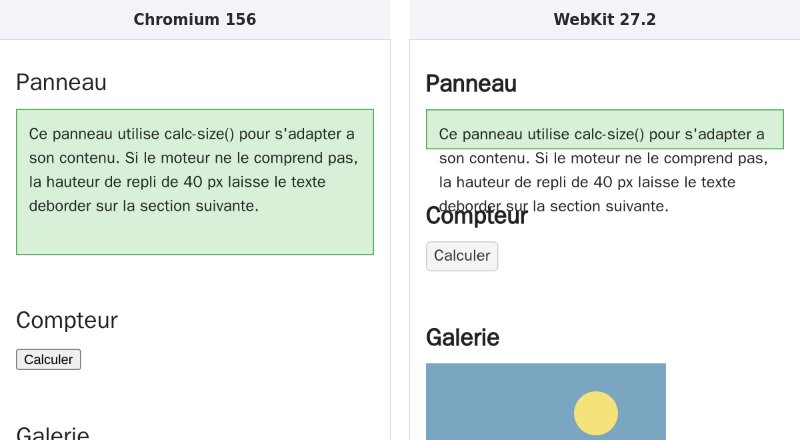
On the full screenshot, 7.86% of pixels differ between Chromium and WebKit at 390 px. Font and anti-aliasing differences alone account for 3 to 5%. The rest comes from D5, which shifts the whole bottom of the page.
What it misses: everything that comes from the iPhone itself
On a real iPhone, Safari's address bar collapses when you scroll the page, and the visible height changes.
CSS has three units for this: 100svh is the height with the bar expanded, 100lvh with the bar collapsed, and 100dvh follows the bar.
100vh is the height with the bar collapsed: when the bar is expanded, the bottom of the D4 banner goes under it.
Playwright's WebKit runs on Linux, in a desktop window. Everything that comes from the phone, rather than the engine, escapes it:
- the dynamic address bar: with the iPhone 15 profile, all four units equal 659 px, the window height. No bar is simulated, and D4 stays invisible;
- the safe area, the margin the iPhone reserves around the notch and the home bar:
env(safe-area-inset-bottom)is 0; - Safari's automatic zoom on a form field with small text. With a 12 px field, the zoom stays at 1;
- the phone's identity:
navigator.platformsaysLinux x86_64,maxTouchPointsis 0, and the fonts aren't Apple's.
Touch events do work: a simulated tap does fire touchstart, touchend then click.
For D4, two options remain: search the CSS for 100vh, or open the page on a real iPhone.
For real iOS, there are two routes, and I tested neither. The first is a real iPhone connected to a Mac, or the Xcode simulator, which also needs a Mac. The second is an online service that rents real iPhones you can drive remotely, some of them with Playwright.
The score table: which solution for which job
Let's start with what each solution makes Claude read during the full task, on the WSL bench, images excluded. For the two MCP servers, I add the size of their tool list, a high estimate since Claude Code may only load part of it.
The second cost is time. When Claude calls a tool, it waits for the answer before deciding what to do next. I call response time the median duration of one tool call, over three runs of 30 to 41 calls, on the WSL bench.
The table puts it next to the text read. Chrome DevTools MCP appears twice. "Launched on its own" means it starts its own Chromium. "Attached" means it connects to a debugging Chrome. I didn't total the text for that second case. The script has no response time, since Claude runs it only once.
| Solution | Text read (estimated tokens) | Response time | Full task |
|---|---|---|---|
| Playwright MCP server 0.0.83 | ≈ 13.4k | 10 to 12 ms | 6.7 s |
| MCP server built into Playwright 1.64.1 | ≈ 13.6k | 16 ms | 7.0 s |
| Chrome DevTools MCP, launched on its own | ≈ 11.5k | 140 to 148 ms | 25.1 s |
| Chrome DevTools MCP, attached | not totalled | 176 to 178 ms | 28.3 s |
| Playwright CLI | ≈ 4.2k | 547 to 556 ms | 22.1 s |
| Playwright as a script | ≈ 0.7k | not applicable | 3.7 s (WebKit), 7.2 s (Chromium) |
The response time is the tool's, not Claude's. Claude also has to read each answer and choose the next call, which I didn't measure on this bench. Clicks stuck in mobile emulation count in the full task, not in the response time. Claude explores by itself with three solutions: Playwright MCP, Chrome DevTools MCP and the CLI. Of these three, the CLI returns the least text, but responds the slowest.
Text and time are only two criteria. I scored the eight solutions from 0 to 10, 10 being best, on nine criteria:
- installation (easy or not), token frugality, interactivity (exploring without writing code);
- engines (WebKit and Firefox on top of Chromium), reliability of mobile emulation, speed of the full task;
- stability (no failure, no hang), debugging depth, project maintenance (recent releases, an install that works).
These scores are my judgement, backed by the numbers in this article: they are not measurements. Bugs found are left out, since my audit finds them all, for every solution.
A score reads with its number. The 9s for tokens come from the 2.8 KB report. DevTools MCP's 3 for speed comes from the 25 s. playwright-go's 4 for maintenance comes from its missing driver, and rod's 3 from its last release in 2024.
The ranking isn't enough to choose. Here is which solution to pick, depending on the job, with the reason:
- Test a site on mobile, tablet and desktop, with WebKit: Playwright as a script, or the CLI with its skills. They are the cheapest to read, and they launch all three engines.
- Explore a page with Claude, without writing code: Playwright MCP. On the WSL bench, its full task returned 8.3k tokens of text, more than half of it an echo of my audit.
- Debug a page's network, console or performance: Chrome DevTools MCP, the richest and also the heaviest. Keep it for that case.
- Work on pages where you're logged in:
connectOverCDPto a dedicated debugging Chrome, with a clean profile and few tabs. Or the Claude in Chrome extension, outside WSL. - Write a test in a Go project: chromedp, with its migration guide at hand. Not rod or playwright-go.
- Check Safari seriously: Playwright WebKit for engine gaps, then a real iPhone for everything else.
Conclusion
The eight solutions found the same bugs: 7 out of 7 in Chromium, where D5 doesn't exist, 8 out of 8 in WebKit and Firefox. That's not to their credit. My audit did the looking for them, and it only spotted D4 by reading the CSS. Their real difference lies upstream: who looks at the page, and what it costs to show it. A script looks on Claude's behalf and hands it 2.8 KB. An MCP server shows it everything, with tens of KB of text and screenshots.
None of the eight saw the best-known iPhone bug on screen: the button hidden by Safari's bar. No solution can show Claude what its engine doesn't simulate. Before choosing, it pays to know what you're looking for, and on which device the bug actually exists.
Sources
Official documentation consulted on October 28, 2026:
- Playwright MCP, README: github.com/microsoft/playwright-mcp
- Playwright CLI: playwright.dev/docs/getting-started-cli
- Playwright, installation: playwright.dev/docs/intro
- Playwright, browsers and WebKit: playwright.dev/docs/browsers
- Playwright,
connectOverCDP: playwright.dev/docs/api/class-browsertype - Chrome DevTools MCP: github.com/ChromeDevTools/chrome-devtools-mcp
- Claude Code with Chrome: code.claude.com/docs/en/chrome
- Claude Code and MCP, tool search: code.claude.com/docs/en/mcp
vh,svh,lvh,dvhunits: developer.mozilla.org/en-US/docs/Web/CSS/length- chromedp: pkg.go.dev/github.com/chromedp/chromedp